This product has been discontinued. Please refer to our other PC based Speech Dictation products at:
Desktop Dictation Solutions / Speechmike Dictation Systems
HTH-VIS-1 Voice Input Station Version 4.0 (April 2010) - Windows 7, Vista, XP, 2000, 98SE compatible!
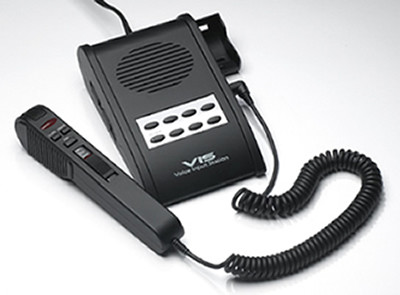
The Voice Input Station is a professional, PC based, voice recording interface. It consists of a fingertip controlled microphone handset and feature rich base station. Simply plug it into your computer's USB port. 8 User-definable Buttons, Slide Switch Microphone/Speaker Handset.
- New for 4.0 - Windows 7 Compatible, Automatic EMail to Multiple Destinations or Automatic FTP, with 128-bit HIPAA file encryption built in!
- New for 4.0 - versatile Insert, Partial and Complete Overwrite Modes now included
- Easily and quickly dictate without looking at the computer screen.
- Users familiar with the operation of tape-based transcribers will be instantly "at home" with the SS-VIS. Just like a tape unit, but with even more power and convenience
- The Start Stop Voice Prompt Assistant will verbally help you as you work, or you can select silent mode
- Eight Console buttons provide automated One-Touch functions
- Windows 7, XP, VISTA, Windows 2000, Windows 98 SE compatible
- Ergonomically designed Slide Switch with Recording, Insert/Overwrite Modes, Quick Review and Pause functions
- Record dictation using the handset, or optionally record any telephone conversation with optional LRX-35 adapter - great for attorney, business, legal or insurance interviews!
- Easily and quickly transcribe voice dictation using the Start Stop Universal Transcription System
- Windows 7, VISTA, Windows XP, Windows 2000, Windows 98 SE compatible
- Records effortlessly in your choice of formats (WAV, MP3, VOX, TrueSpeech, and more)
Features
- Simple Connection to your PC's USB port and Sound Card jacks.
- Dictate in any one of 6 digital audio file formats. (WAV, Truespeech WAV, MP3, WMA,VOX and OGG) with full control over quality, bit rate, and file size.
- Ergonomic, familiar Slide Switch for quick, easy dictation and control of all dictation functions.
- Dictation and Playback qualiy are crystal clear.
- You can enable optional Voice Prompts that"talk" you through each step, or turn Voice Prompts off for expert use.
- Instant Review Function allows 3-second play back of current dictation in progress using the VIS handset.
- Insert and Overwrite capabilities on a file being recorded or a pre-recorded file.
- Easy-to-Read, informative screen shows audio length, audio position, recording levels and file size information.
- Quick beginning, ending, stepping movement within the file via the console or the VIS handset.
Advanced Technical Features
- Command-Line Launching and Naming for users who want to integrate the Voice Input Station to their own applications.
- Automatic file recovery module allows recovery of dictation due to improper shutdown or PC power loss.
- TCP communications module for integration into other systems.
- Operate totally hands-free while dictating using optional VIS-FPDL footpedal
- Deletion feature for dictation older than the number of days you specify
Versatile Audio Features
- Accepts multiple audio source inputs including an external microphone, and PC line-input for recording from telephone recording adapters or other audio devices.
- Recording level "VU" indicator.
- Seperate recording and playback volume controls for precise control.
- Manual File Naming for users who want to name each file on the fly.
- Add Comments to Beginning and Add Comments to End buttons let you quickly verbally annotate a dictation (current or previously saved).
Send Files Anywhere
- When finished with the dictation, a single click of the End of Letter (EOL) button saves the file and optionally sends file to one or two local or remote networked locations.
- Automatic File Naming sequential, with customizable file name prefix or with Date-Time stamp embedded file name.
- BUILT IN HIPAA Security feature, so you can securely send dictation off-site or to remote transcriptionists with the touch of a button (email, ftp, or Port to Port) with 128 bit security.
Ergonomic Features
- "ALWAYS ON TOP" feature lets your StartStop stay on top. Adjust position on the screen like a Post It� note, or minimized in the background entirly.
- "RECENTLY OPENED FILES" Window shows last 15 files that you have opened, for easy access to re-open.
- Software automatically records your configuration preferences each time you use it, so the next time you launch the program, you're ready.
- Eight VIS Console Buttons provide instant, one-touch operation for common functions such as "Send Dictation to Transcriptionist #1" or "Listen to Previous Dictation" with VOICE CONFIRMATION OF RECEIPT of your dictation.
What's Included
- HTH Voice Input Station with USB and audio connection
- Start Stop Digital Recording Software, Version 4.0
- User Manual
- 1 year Warranty
 Loading... Please wait...













 $259.00